 ASCII
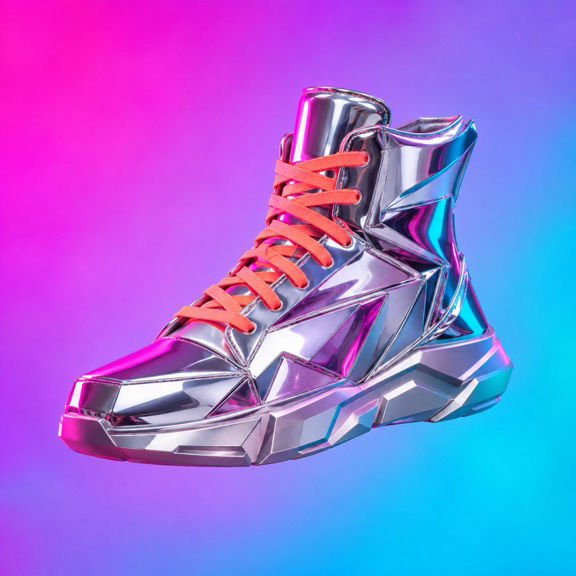
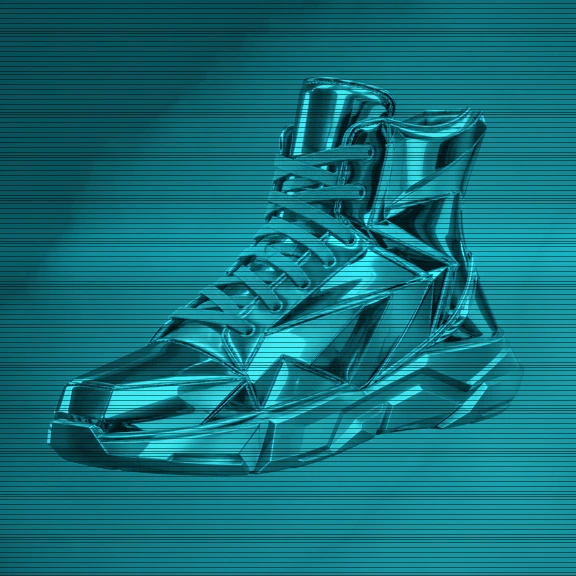
What the effect does

Fine scan lines cross the collar.

Bright cyan picks out the laces.

Angular facets outline the sole.
Make it on iPhone
-
Import
Open your media in ASCII Lab.
-
Tune
Select the effect and check the preview.
-
Export
Choose a format and save your result.
Where to use it


Light an object so its shape survives the scan
The sneaker in the example is made of folds, angular surfaces and narrow seams. In the result, the same seams continue to describe the shoe under the cyan tone. The shape has a dark side and bright facets. The horizontal lines cross both, so the sneaker looks like an object seen through a display. A plain setting leaves enough space to judge the effect around its outline, including the toe and the top of the ankle.

A face turning under side light or a model held in front of a dark wall works for the same reason. Jog the frame and look at the profile first. A flat front light may make a white shirt and a white backdrop merge. Adding a side light or choosing a darker corner of the room can reintroduce edges. If the original light is colored, use the original only as a guide to the values. The signal palette changes how you read those colors.
Use contrast to keep the object readable
Check the darkest fold and the brightest reflection. If both have become solid patches, back off contrast until a few seams return. Move brightness next and judge the reflection again. If the entire background has become a flat cyan field, a tighter crop may help, or you can start with a frame where the object is lit more selectively. The useful question is which detail still tells the viewer what they are seeing.
Check the darkest fold and the brightest reflection.
Try a moderate density and look for small areas where the horizontal texture crosses a thin edge, such as a strap or a nose bridge. For a video, replay that movement as well as the still. Check the export without extra scanlines first. Additional scanlines or glow are Pro controls and need care when the treatment already has bands. If a caption will be baked into the composition, preview it where the shot is darkest. Small type can look different against cyan than it does over the natural colors.
Stage a broadcast without building a set
For a product Reel, film one slow turn in simple light and let the object reveal different facets. Start near the angle that makes its purpose obvious. A silhouette that reads in the first second gives the movement time to show the effect. Leave an open corner for the product name and use the same crop in the clean and processed versions.
For a music clip, use the look as a recurring insert of a singer or instrument rather than putting a dense field of lines over the full performance. Keep the camera at a consistent height for repeated angles. On the next insert, the audience can recognize both the object and the style without an explanatory caption.
A single shoe or helmet can also make a square cover. Reserve the darkest panel for title text. If the object already has strong horizontal seams, consider a simpler title style so the lettering stays distinguishable. In the final crop, inspect thin edges at the size the cover will be displayed and keep the brighter contour inside the frame.
Questions
What distinguishes Hologram Signal from Holographic Contour?
Hologram Signal changes the look of the whole surface with a cyan tone and horizontal texture. Holographic Contour is useful when you want the edges to carry most of the image.
Can I export this effect without Pro?
An existing installation eligible for legacy Free access can export this effect as PNG up to 1080 px. New installations need active Pro or an eligible active trial after onboarding. All MP4 export requires Pro.


